
Introducing Grouply
Group texting, built into the phone number you already have.
Keep your group together for $0
Free for anyone · No monthly fee · No existing Voitex customer required
GroupMe closed the door on SMS. We’re opening it.
When GroupMe ended its SMS support, countless groups lost the easiest way they had to stay in touch. Voitex already powers phone systems, hotlines, conference lines and mass call & SMS notifications — so group texting belongs on the platform too.
Meet Grouply. Text one number and your whole group gets the message — on any phone, with no app to install.
Notify your group!
Admin-only groups are open to everyone — just create your free account and text your group from the phone you already carry.
for messages to the members included in your allowance
See your allowance- Picture or video
$30 per extension
Starter
$50 / month
a month — no subscription, no member limit, no contract.
- Picture or video
Announcement groups
Admins broadcast. Members receive.
- No member limitGrow the list as large as you need.
- Easy portal managementSee your members, groups and deliveries in one place.
- Add or remove members from your phoneText
#ADDor#REMOVEand it’s done. - You send, they receiveEvery member gets each message by text or call.
What you can text
Send any of these to your group's number. Most start with a # so we can tell them from an ordinary message; a few keywords work on their own. Capital letters aren't required.
Admin commands
group admins onlyMember commands
anyone in the group, admins includedThe group, from your side
Texting runs the group day to day. The portal is where you watch it, name your groups and manage who is in them.
Deliveries, hour by hour
One message fans out to the whole group, so the chart counts the deliveries behind it — today, this week or this month.
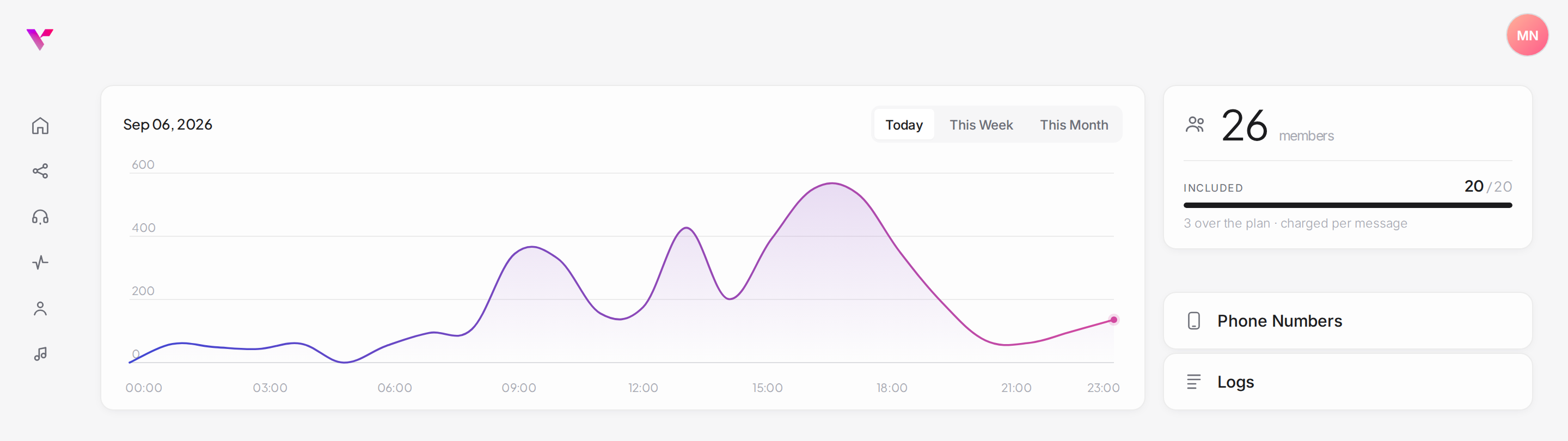
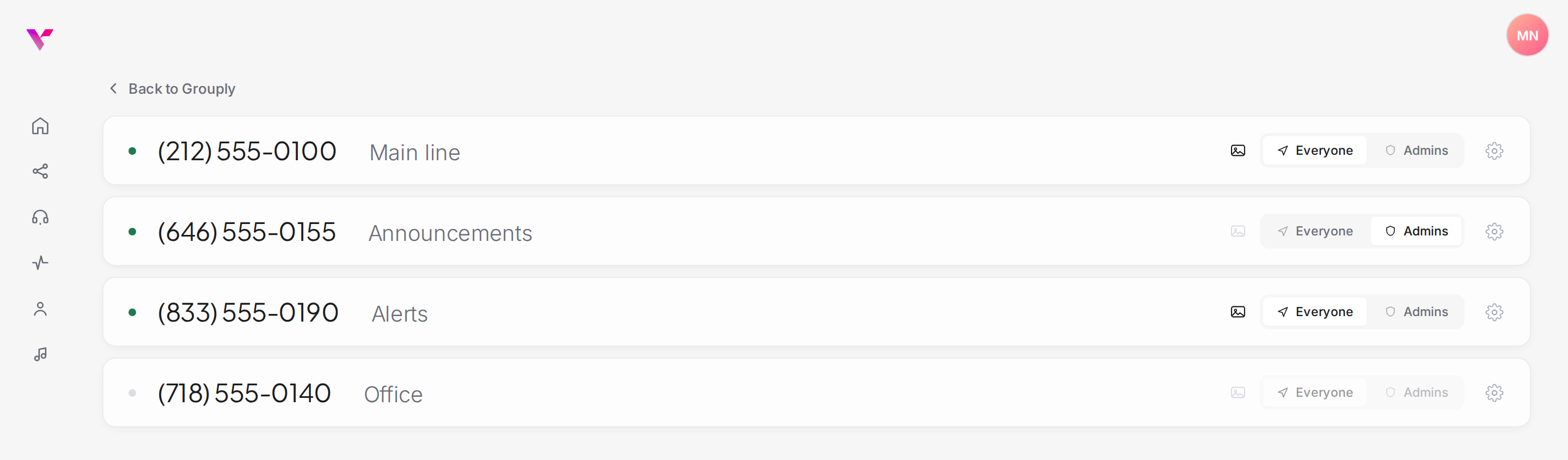
Every number is a group
Name it, switch it on, and choose who may send. Each number keeps its own rules, so no two groups have to behave alike.
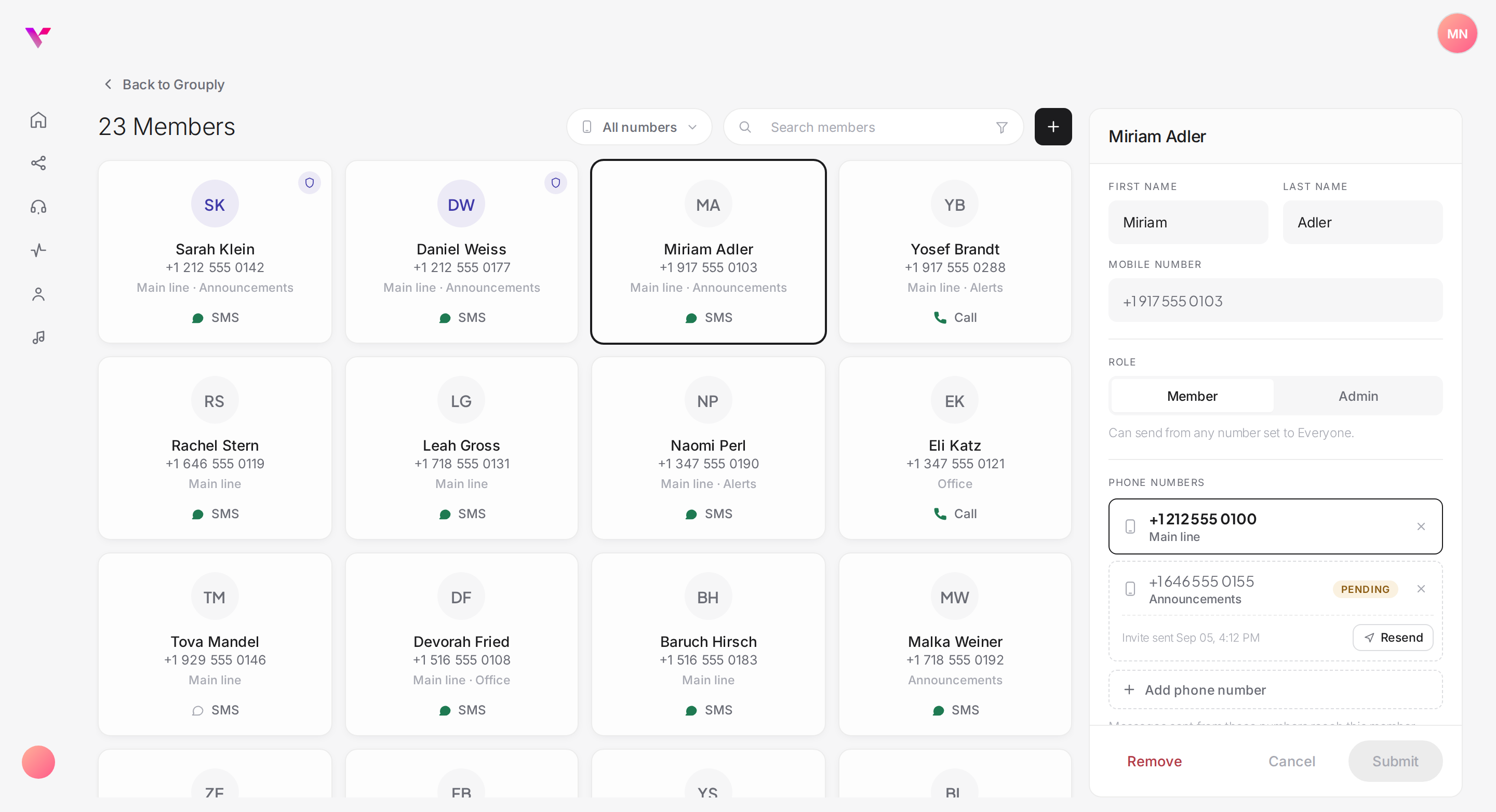
Everyone, at a glance
Each member is a card: the numbers they are on, whether they get a text or a call, and whether they are active, pending or opted out.
Everything Grouply does
A group is one of your numbers with Grouply switched on. All of this comes with it, set per number — so no two groups have to behave alike.
Every number is a group.
Switch Grouply on for a Voitex number and it becomes a group. Text the number, and everyone on it gets the message.
Unlimited groups
Any number on your account can be a group of its own. No limit, no per-group fee.
Named in the portal
Give each group a name and it follows the number everywhere it appears.
Its own rules
Quiet hours, message length, who may send, spending caps — all set per number.
Its own members
Someone can be on the "Main Line" but not on "Announcements", and an admin on one while a plain member on the other.
Anyone with a phone.
No app to install, no account to create, no smartphone required. If it rings or receives a text, Grouply reaches it.
Plain text messages
Ordinary SMS from your group's number, with the sender's name in front.
Or a spoken call
Switch a member to call delivery and Grouply rings them and reads the message aloud — a landline, or a mobile that doesn’t do texts.
Pictures and video
MMS is set per group, and bills at the higher picture rate — leave it off and only text goes out.
Any alphabet
Accents, Hebrew, emoji — sent as Unicode, which shortens a billed segment to 70 characters.
Your rules, before a message leaves.
Carrier requirements and house rules both live on the number, and Grouply enforces them on the way out.
Admins, per group
Promote someone on one group without giving them the run of the rest.
Who may send
Everyone, or admins only. An admins-only group still delivers to every member.
Invitations, not additions
A new member stays pending until they reply for themselves. Nobody is signed up silently.
Quiet hours
Set a window; anything sent outside it is held and released the moment it opens.
STOP always works
The carrier network intercepts it before it ever reaches us, so a member opts out the moment they send it.
Length and spending caps
Past 160 characters a message bills as several segments. Cap the length, the overage and the monthly spend.
Nothing is a black box.
The portal shows what went out, who received it, and what anyone changed.
Deliveries, hour by hour
A live chart for today, this week or this month, with the messages behind each point.
A log of every change
Adds, removals, renames, settings, released queues — with who did it and when.
Who is in, who is waiting
Active, switched off, pending or opted out, filterable in one click.
Rules for each group
Who may send, quiet hours and message limits, set separately for every number.
Can’t text? We’ll call and read it out.
A landline at the front desk. A mobile that never took to texting. A handset that only rings. Set any member to call delivery and Grouply phones them the moment the group is messaged, and reads it aloud.
It belongs to the member, not the group — so one group can be half texts and half calls, and nobody changes the phone they already use.
- landlines
- mobiles without texting
- no app
Van leaves at 9 AM
You set the ceiling
Everything that bills is optional. Each group carries its own limits, and Grouply stops at them rather than asking you afterwards.
Block pictures and video
Turn MMS off for a group and only text goes out — nothing ever bills at the picture rate.
Cap the monthly usage
Give a group a ceiling it can’t spend past. Once it’s reached, nothing more sends.
Questions, answered
Group types & pricing
What types of Grouply groups are there?
Two. Admin style: only admins send, and every member receives — an announcement list. Chat style: everyone in the group can send, and each message goes to the whole group. You choose the style for each number under “Who can send” in the portal.
Is Grouply free?
Yes — admin-style groups cost nothing per month. There is no monthly fee and no member limit, and you don’t need to be an existing Voitex customer: just create a free Voitex account. The only charge is a one-time $20 setup fee per group.
What does a chat-style group cost?
Chat-style groups are open to anyone with a Voitex account, with no monthly fee — each message is $0.01 per 160 characters, per member. With a Voitex business phone system or Hotline, the members included in your plan’s allowance are free, and only members past it are charged.
Do I need to be a Voitex customer?
No. Both styles are open to anyone with a free Voitex account. Being a Voitex phone system or Hotline customer adds free members to chat-style groups, up to your plan’s allowance.
Can I make a group on a different number than my phone system?
Yes. Once you have a Voitex account, you can create a chat-style group on a separate number — one that isn’t tied to your regular phone system or Hotline.
How are messages counted?
Each message to each member counts as one. A message written with non-English characters counts as two.
Is Grouply a free alternative to GroupMe SMS?
Yes. GroupMe ended its SMS support; Grouply keeps a group reachable by plain text message, and admin-style groups are free for anyone. Members need no app and no account — any phone that receives a text or a call works.
Using Grouply
Do the people I add need an account?
No. A phone that can receive a text — or a call — is the whole requirement.
Is there a limit on how many messages we can send?
No. There is no cap on how much a group sends, and we carry that cost. We do reserve the right to get in touch about charges, or to withdraw the service, where usage is clearly excessive.
How do I keep a group inside the free usage?
Switch the charges off. In the portal each group can block pictures and video, block non-English characters and cap the message length; a chat-style group can also skip members past your allowance. Each group can carry its own monthly ceiling too.
Can I run more than one group?
As many as you have numbers. Each is separate: its own style, name, members, admins and rules.
Does someone have to agree to join?
Yes. Adding a member sends an invitation, and they stay pending until they reply YES — or Y, ACCEPT, OK, OKAY — from their own phone.
What if someone has no SMS?
Switch them to call delivery. Grouply rings them and reads the message aloud — on a landline, or on a mobile that can take calls but not texts.
Can I stop messages going out at night?
Turn on quiet hours for that number. Anything sent inside the window is queued and released when it ends.
What happens when someone texts STOP?
They stop receiving immediately. STOP is intercepted by the carrier network before it ever reaches Grouply, so it works whatever else is going on.
Can I manage a group from my phone?
Admins can text #ADD <phone> and #REMOVE <phone>. Anyone can text #INFO for how the group works, #HELP for the compliance reply, and #LEAVE to leave.